Logs
Overview
The Logs page provides a complete audit trail of all actions and events that have occurred on the G-Immute system. Every user action, system event, warning, and configuration change is recorded here with a timestamp. This is essential for monitoring, troubleshooting, and security auditing.
To access this page, click on LOGS from the left navigation menu.
User Activity Log
The User Activity Log displays a chronological list of all system activities. Each entry shows the exact date and time alongside a description of what happened.
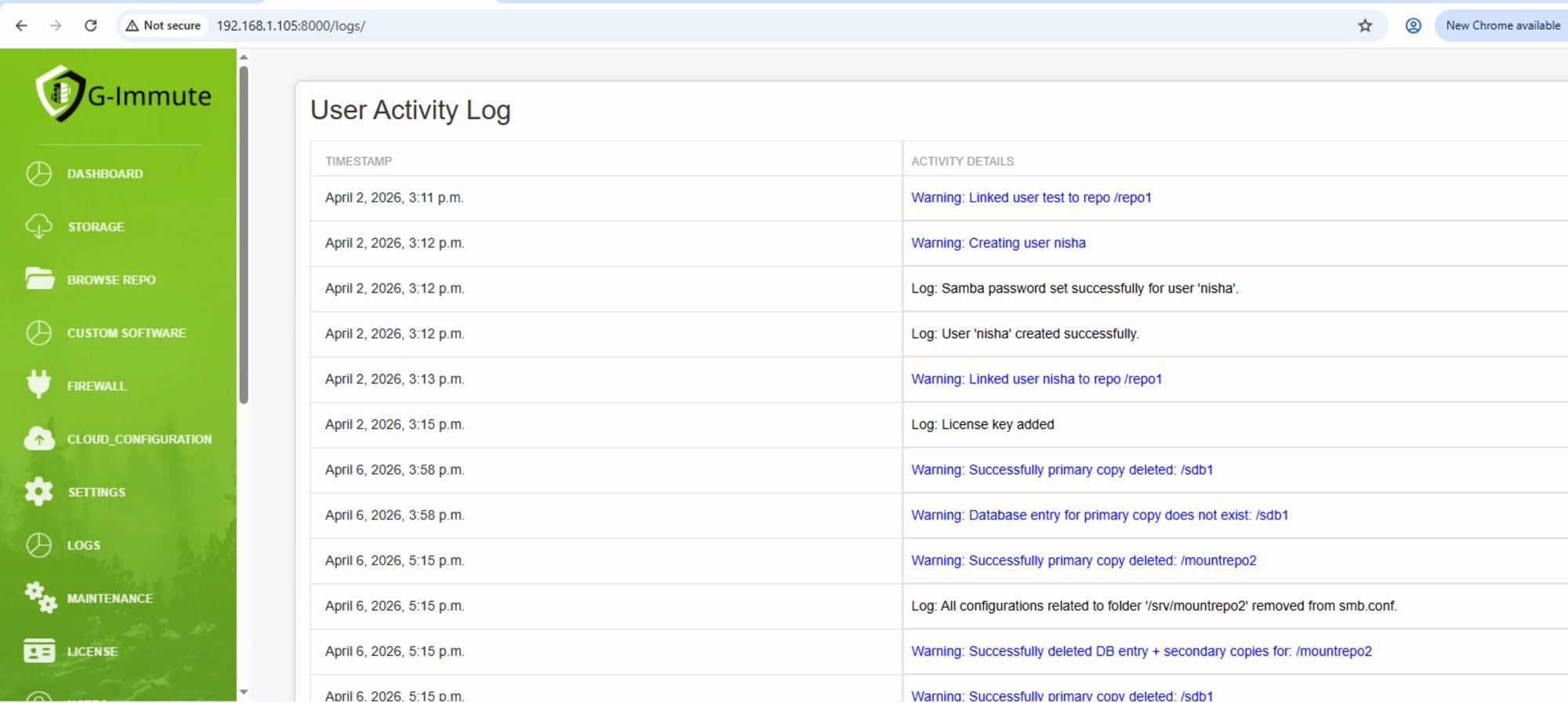
Figure 57 — User Activity Log showing system events and actions
| Element | Description |
|---|---|
| TIMESTAMP | The exact date and time when the activity occurred. Example: April 2, 2026, 3:11 p.m. |
| ACTIVITY DETAILS | A description of the event. Entries starting with Log: are informational. Entries starting with Warning: (shown in blue) indicate important system events that may need attention. |
Log Entry Types
Each log entry is prefixed with either Log: or Warning:.
Log entries are standard informational messages confirming an action completed successfully — such as a user being created or a password being set.
Warning entries are highlighted in blue and represent significant system events that may need administrator attention, such as users being linked to repositories, primary copies being deleted, or database entries being removed.
All entries are recorded chronologically so administrators can trace exactly what happened and when across the entire system.
Regularly review the Logs page to monitor system activity, detect unauthorized actions, and troubleshoot issues. Warning entries (shown in blue) indicate significant events that may require administrator attention.